
So, you want to do your own SEO? Good for you! I encourage all business owners to take part in their own SEO efforts whether they are working with us or not. There are plenty of areas of SEO you can do yourself.
 Where to Start With Do-It-Yourself SEO
- Keyword Research:
You know what you think you should rank for, but do you know what your potential customers are actually searching for when looking for your offerings? Set up Google Search Console – this will show you what people are searching for to cause your site to appear in the search listings. Not necessarily clicking on your site but you’ll see what real people are searching for in relation to your business. Then you can use that information to… - Write Content:
You are the subject matter expert so you’re the best person to write intelligent, informative content about your products or services. In fact, even when we’re writing content we make it a requirement for our clients to be involved in the process, at least at the start of a campaign. - Social Media:
If you haven’t already, start a business Facebook page. Then every time you have a promotion, write a new page on the site or have any relevant information about your business or customers post it. Add images and a call to action like “Click here for the deal!” - Citations:
Search your exact business name and see what comes up. If you’ve been around for a while you might have hundreds of results from other sites that have listed your business in their directories. Claim each and check for accuracy. It’s important all details (name, Address, Phone number) are correct and ideally identical from site to site. Then Search your competitors and sign up for any citations they have that you don’t. It’s time consuming, but worth it – create one or two a day until you dominate. - Secure Your Site:
Call up your hosting company and ask them to install an SSL Certificate. This is critical as Google devalues sites that aren’t secured.
 That’s a basic list of do-it-yourself SEO advice that anyone can follow. There are more advanced techniques and tools that will greatly help your efforts. However, not all of them are equal. In my opinion, Google Search Console (free tool) is your best bet unless you are able to pay $500+ per month for some of the other SEO services. If that’s the case, call us and see how you can leverage our suite of tools and SEO consultant’s experience for the same price.
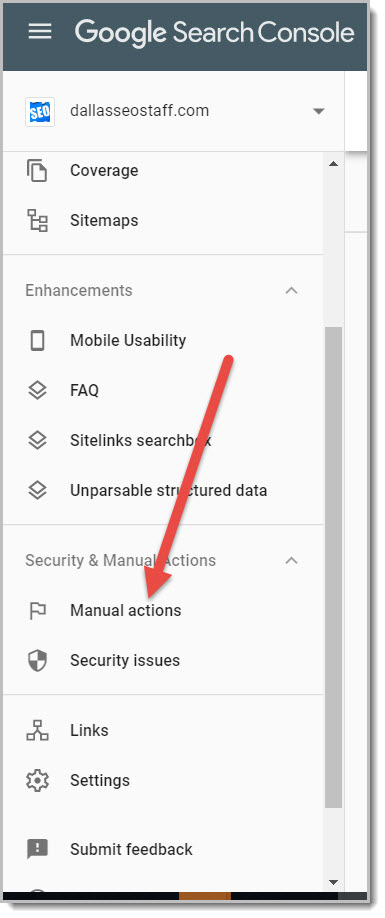 Once you log into GSc you’ll see”Security and Manual Actions” on the left. Click that to see if you have a manual penalty and what the reason is. So now all you have to do it remove the thing that’s causing the penalty. Easy. The next step is to resubmit all offending pages to Google and…. wait… and wait… and wait…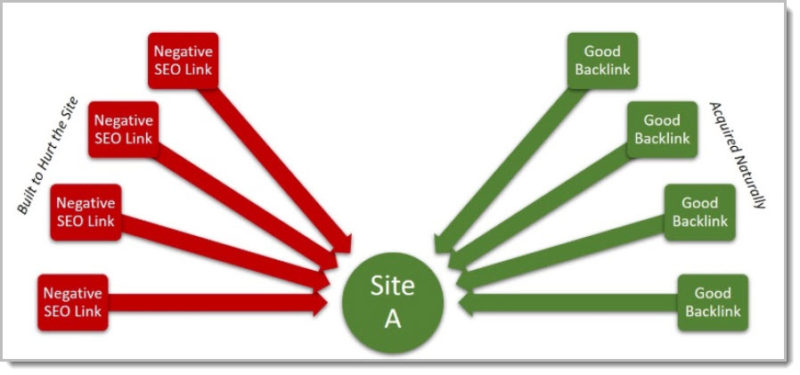
 Before we dive into Penguin we need to understand what negative SEO is and how it can affect a website. In short negative SEO is actions taken to hurt your website. It comes in many forms but the most common and easiest is when a competitor sends a bunch of bad / spam links to your site to make Google think you are the one practicing link schemes. This is the focus of this article, but there are many other forms of negative SEO such as mass posting bad reviews or even posting an entire site of bad content with tricky canonical tags. You can been hurt yourself with unintentional negative SEO by doing things like making your Google My Business profile too sales-pitchy or accidentally keyword stuffing your site.
 Cool – You know you probably need a
  Other Questions to Consider
 SEO (Search Engine Optimization) might be a confusing, even scary term for small business owners. Of course with any other area of your business it’s best to start with a professional. I mean, you (probably) wouldn’t fight your own legal battle or fix your company’s AC system. Right? You will get the best results
  Need some Help?